
NightWin Account: Registration, Login, Password Reset, and KYC Verification
This page covers everything connected with a NightWin account from first creation through to ongoing management. That includes the sign-up form and bonus selection, the login process, recovering access after forgetting a password, identity verification before withdrawals, security settings, and tools for responsible gambling. It is the hub for account-related questions - each topic is covered here in full rather than distributed across the site.
The screenshots reviewed for this article show the live registration and lobby interface. Where specific details are visible from those images - the exact form fields, the bonus selection screen layout, the login tab placement in the bottom navigation - the descriptions here reflect what is actually displayed rather than what might be assumed from generic casino patterns.
One important note upfront: NightWin is a Curacao-licensed platform operated by Flybergom B.V. The account management obligations, dispute resolution options, and responsible gambling requirements that apply are those of the Curacao framework rather than the UK Gambling Commission. The main platform overview covers the full regulatory context for players who want to understand what that distinction means in practice.
NightWin Account Reference: Registration and Login at a Glance
The table below consolidates the key parameters for account creation, access, and management at NightWin. Rows marked "not published" reflect genuine gaps in the casino's disclosed documentation.
| Parameter | Value |
|---|---|
| Minimum player age | Not published (standard UK legal minimum is 18) |
| Registration fields | Email address, UK phone number (+44 prefix), Password |
| Social registration (Google / Facebook / Apple) | Not available |
| Login methods | Email address, Phone number, Username |
| Biometric login (Face ID / fingerprint) | Not described in published materials |
| Two-factor authentication (2FA) | Not confirmed in published materials |
| Promo code entry at registration | Yes - Special Offer tab in bonus selection row |
| Password recovery channels | Email and / or phone number |
| KYC documents required | Not published (identity + address are standard practice) |
| Account verification timeframe | Not published |
| Account deletion process | Not published - contact support required |
| Deposit limit setting | Available (self-service process not described) |
| Self-exclusion | Available (process not described in published materials) |
How to Register at NightWin Casino: Sign-Up Walkthrough
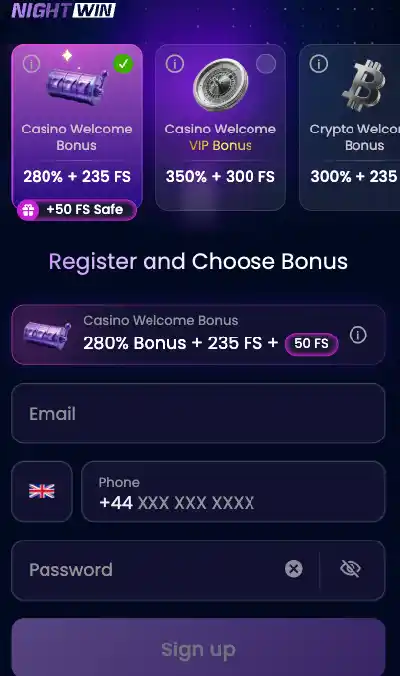
Three fields make up the entire NightWin registration form: an email address, a UK phone number, and a password. The form is short by design, and the account becomes active as soon as it is submitted. What makes NightWin's sign-up flow slightly unusual is that bonus selection comes before the form - the platform asks which welcome offer you want before you fill in your personal details.
From the registration screen visible in the screenshots reviewed for this article, the Sign Up button sits at the bottom of a compact form containing the three fields. The UK country code (+44) is pre-filled in the phone field. No T&C agreement checkbox is visible in the sign-up screen at that stage, though the platform's Terms and Conditions remain binding and are linked from the site footer.
- Open the NightWin site and tap Sign Up. The bonus selection screen loads first, showing three welcome offer tiles and a Special Offer tab. Choose the bonus you want - or select Claim Bonus Later / Just Play to skip bonuses entirely - before continuing to the account form.
- Fill in your email address, your UK phone number in the format +44 XXX XXX XXXX, and create a password. The password field includes a reveal toggle. No minimum complexity requirements are displayed on-screen, so standard practice (a combination of letters, numbers, and symbols) applies until NightWin publishes specific password rules.
- Tap Sign Up. The account opens immediately. No email confirmation step was visible in the screenshots reviewed, though a confirmation email may be sent in the background. The main lobby loads straight away with the casino section active.
What Information Do You Need to Register at NightWin?
Just three pieces of data are required at the point of account creation: an email address, a UK phone number, and a chosen password. NightWin does not ask for a date of birth, a physical address, or payment card details at sign-up - these are collected during the KYC verification stage that precedes first withdrawal. The pre-filled +44 country code in the phone field confirms the form is oriented towards UK-based players, though it can be changed to another country code if needed.
Is Social Sign-Up (Google or Facebook) Available at NightWin?
No. The NightWin registration screen, as visible in the screenshots, contains only the three standard fields (email, phone, password) with no social login buttons. Players who use Google, Facebook, or Apple sign-in on other platforms will need to create a dedicated NightWin account with an email and password.
Choosing a Bonus at NightWin Registration
The bonus selection screen at NightWin appears before the registration form itself. Three tiles are displayed: the Casino Welcome Bonus (280% and 235 free spins, with an additional 50 Safe FS), the VIP Welcome Pack (350% and 300 free spins), and the Crypto Welcome option. A fourth choice - Claim Bonus Later / Just Play - allows registration without claiming any offer immediately.
The bonus choice made at this stage is tied to the account. If you want a promo code bonus instead of the default offers, this is the point to switch to the Special Offer tab - there is no mechanism to enter a code after registration is complete.
Which Welcome Bonus Should You Choose When Joining NightWin?
The right choice depends on two factors: how much you plan to deposit first and whether you are depositing with cryptocurrency. Standard casino players depositing moderate amounts gain most value from the 280% Casino Welcome Bonus; larger first deposits favour the VIP Pack's higher match rate. Cryptocurrency depositors should select the Crypto Welcome option to unlock the crypto-specific offer rather than the standard casino package. Full terms, wagering requirements, and a comparison of all three options are set out in the NightWin welcome bonus at sign-up section.
How to Enter a NightWin Promo Code at Sign-Up
The Special Offer tab appears at the far right of the bonus selection row on the registration screen - it is the tab labelled with a gift or promotion icon. Tapping it reveals a text entry field where a promo code is typed or pasted. The code must be entered before the Sign Up button is tapped; the field is not accessible post-registration. If the code is accepted, the associated bonus replaces the default offer for that account. If the code is invalid or expired, the field shows an error before the form is submitted, allowing you to switch to a standard offer instead.
Signing In to NightWin: Login Methods and Access Points
The NightWin login is accessible via the Log In tab - the centre icon in the bottom navigation bar visible across the app screenshots. The login screen accepts any one of three identifiers paired with the account password: the registered email address, the UK phone number used during sign-up, or the account username.
Sessions at NightWin remain active until manually signed out. There is no published session timeout period in the materials reviewed here, which means a session started on a mobile browser may persist across multiple visits.
NightWin Login Methods: Email, Phone Number, and Username
Any of the three identifiers set up during or after account creation can be used to sign in. The email address and phone number are captured at registration; the username, if separate, would be added during account setup or in the account settings. The login screen has a toggle or selector to switch between identifier types. Whichever method is chosen must be paired with the correct account password - there is no PIN or pattern-based login described in NightWin's published materials.
Why Can't I Log In to My NightWin Account? Common Causes and Fixes
Login failures at NightWin fall into four categories. First, an incorrect password - the most common cause. Using the password reveal toggle in the login field to confirm what has been typed avoids simple keyboard input errors. Second, the wrong identifier type - entering a username in the email field, for example, produces an error even if the credentials are otherwise correct. Third, a temporarily locked account after a run of failed login attempts; NightWin's system blocks access briefly as a fraud-prevention measure, and waiting a few minutes or using password reset resolves it. Fourth, a session conflict in the browser or app cache, which can be cleared through browser settings without affecting account data.
If none of these applies and the account appears accessible on desktop but not mobile, the most likely cause is a stale WebView cache in the app. Clearing the app's stored data through Android settings resets the session without removing the account.
Forgotten Your NightWin Password? How to Reset It
NightWin's password recovery is initiated from the login screen using the relevant prompt. The process sends a reset link or verification code to the registered email address or phone number, depending on which channel is used. Most recoveries complete within minutes.
- On the login screen, tap the Forgot Password link or equivalent prompt. You are taken to a recovery form.
- Enter either the email address or phone number registered to the account. Submitting the form triggers the reset communication.
- Check the email inbox or SMS messages for the reset link or code. Click the link or enter the code on the NightWin reset page. The expiry window for the reset link is not published by NightWin, so acting promptly is advisable.
- Enter a new password in the field provided and confirm it. The password is updated immediately and the account can be accessed with the new credentials.
Resetting a NightWin Password by Email
Email recovery sends a link to the address registered to the account. The link takes the user to a page where a new password is entered and confirmed. NightWin's published materials describe this as the primary recovery channel. If the email does not arrive within a few minutes, checking the spam or junk folder is the first step; if it is still absent, using phone-number recovery instead or contacting live chat is the alternative.
Recovering NightWin Account Access via Phone Number
Phone number recovery sends a verification code by SMS to the +44 number entered at registration. The code is entered on the NightWin recovery page in place of the email link. This channel is useful when access to the registered email address is also unavailable - for example, if the email account itself has been lost. Both channels lead to the same outcome: a new password is set and the account becomes accessible.
NightWin Account Verification (KYC Process)
NightWin requires identity verification before processing any withdrawal. This is a standard requirement under its AML/KYC policy, linked from the site footer. The specific documents the platform requests are not named in published materials, but standard industry practice involves a government-issued photo ID and a proof of address.
Tip: submit your KYC documents immediately after creating your account rather than waiting until you want to withdraw. Proactive submission means the verification check is completed while there is no time pressure. A withdrawal request that triggers a first-time identity review adds a processing delay that does not exist for already-verified accounts.
What Documents Does NightWin Require for KYC Verification?
NightWin's AML/KYC policy is referenced from the footer but does not list specific document requirements in the materials reviewed here. Based on standard Curacao-licensed casino practice, the expected documents are a government-issued photo ID (passport, driving licence, or national identity card) and a proof of address dated within the last three months (utility bill, bank statement, or official correspondence). A selfie or a photograph holding the ID may also be requested. None of these requirements is confirmed explicitly for NightWin, and the actual document list should be checked through the My Account section or live chat.
How Long Does NightWin Account Verification Take?
NightWin has not published a stated timeframe for identity verification in available materials. Standard turnaround at Curacao-licensed casinos ranges from a few hours to two business days for complete, legible submissions. Incomplete documents - those that are blurred, partially obscured, or expired - restart the review process, which is the most common reason for extended verification timelines.
NightWin Account Security Features
NightWin applies 256-bit SSL encryption to all account sessions, alongside session monitoring that flags unusual activity patterns. These are baseline security measures present across all licensed online casinos. Two specific features that players commonly look for - two-factor authentication and biometric login - are not confirmed in NightWin's published materials.
Does NightWin Offer Two-Factor Authentication (2FA)?
NightWin has not confirmed two-factor authentication in any published materials reviewed here. 2FA - which typically sends a one-time code to a registered phone or authenticator app on each login - is a meaningful additional layer of account protection that is increasingly standard on UK-facing platforms. Its absence from NightWin's published documentation does not confirm it is unavailable, but players who rely on 2FA as a security requirement should contact support to ask before registering.
How Does NightWin Handle Suspicious Login Activity?
NightWin's system monitors sessions for unusual activity patterns. When flagged, the system can request additional confirmation before granting access or apply a temporary login block. After multiple failed login attempts, access is blocked briefly - a standard fraud-prevention mechanism that catches both unauthorised access attempts and genuine users who have misremembered their password. Players who believe their account has been accessed without authorisation should contact live chat immediately and follow up with a password change.
NightWin Account Settings and Management
Account settings at NightWin are accessible through the My Account section in the main menu. This section covers personal details, transaction history, active bonuses, and responsible gambling tools. Some updates - particularly changes to the registered email address or phone number - may require identity confirmation before taking effect, as these are the primary account recovery channels.
How to Update Personal Details on a NightWin Account
Standard detail updates such as a display name or preferences are typically self-service within the account settings. Changes to security-sensitive details - the registered email address, phone number, or password - require authentication and may involve a verification step. The exact self-service capabilities in NightWin's account settings are not fully documented in publicly available materials; contacting live chat for changes that cannot be completed through the standard My Account interface is the reliable fallback.
How to Delete Your NightWin Account Permanently
NightWin does not describe an account deletion process in any published materials reviewed here. The standard approach across Curacao-licensed casinos is to contact the support team directly - by live chat or email - and submit a formal account closure request. If the account has an active balance, withdrawal before closure is required. Self-exclusion (covered in the next section) is an alternative to deletion if the goal is to prevent further gambling activity rather than to remove the account record entirely.
NightWin Responsible Gambling: Account Limits and Self-Exclusion
NightWin provides a Responsible Gambling page accessible from the site footer. Deposit limits and self-exclusion are the two primary tools described, both of which are standard requirements under the Curacao licence framework. The specific self-service process for setting either is not detailed in published materials.
For context on how NightWin's responsible gambling obligations compare to those of UKGC-licensed operators, the NightWin licence and responsible gambling section of the platform overview covers the regulatory differences.
How to Set Deposit Limits on Your NightWin Account
Deposit limits allow a player to cap the amount they can deposit within a defined period (daily, weekly, or monthly in standard casino practice). NightWin has not published whether limits can be set directly within the account settings or whether a support request is required. Either way, setting a limit is a one-way door in regulated contexts - reducing a limit takes effect immediately, while increasing one may involve a waiting period to prevent impulsive reversals. Checking with NightWin's live chat for the exact mechanism is advisable before relying on this tool.
How to Self-Exclude from NightWin Casino
Self-exclusion closes access to the casino for a chosen period, after which access may or may not be automatically reinstated depending on the platform's policy. NightWin references responsible gambling tools from the site footer but does not describe the self-exclusion request process in the materials reviewed here. The most direct route is to contact live chat and state clearly that self-exclusion is being requested. Players who require guaranteed exclusion from multiple platforms simultaneously may want to consider the UK's self-exclusion scheme, GAMSTOP, which covers UKGC-licensed operators but not Curacao-licensed platforms such as NightWin.
Using Your NightWin Account on a Phone or Tablet
The full account creation and login flow is available on mobile - both through the NightWin Android app and through any mobile browser on iOS. The screens visible in the screenshots show that the registration and login interfaces render correctly in portrait mode on a standard phone screen. The bottom navigation bar includes a Log In tab as one of the five main navigation options.
How to Create a NightWin Account on a Smartphone
The sign-up process on mobile is identical to desktop. Open the site or app, tap Sign Up, select a bonus offer or choose to play without one, and fill in the three-field form (email, phone, password). The +44 UK phone prefix is pre-populated on mobile as it is on desktop. Touch keyboards handle all field types correctly - the email field triggers the email keyboard, and the phone field triggers the numeric pad. The Sign Up button is clearly positioned below the form and submits when tapped.
Staying Signed In: Session Handling on Android and iOS
The NightWin session persists on mobile until the player manually signs out or until the browser or app cache is cleared. On Android, the NIGHT CASINO app retains the session across launches as long as the app's stored data is not cleared through system settings. On iOS via Safari, the session persists across browser tabs and restarts as long as Safari's website data for the NightWin domain has not been cleared. Players who share a device with others should sign out manually after each session rather than relying on automatic timeout, since NightWin has not published a session expiry period. Full context on how to deposit at NightWin after completing registration is in the payments section.
Where NightWin's Account System Has Gaps
The registration and login process at NightWin is functional and straightforward in the steps that are documented. Three gaps in the published information create practical uncertainty for specific player types.
Unconfirmed 2FA and Biometric Login
Two-factor authentication and biometric sign-in are standard expectations on UK-facing casino platforms in 2026. Neither is confirmed at NightWin. For players who rely on 2FA as a non-negotiable security feature, the absence of confirmation means contacting support before registering is the only way to know. The gap is worth raising because account security is not recoverable after a breach - it is a prevention-stage requirement.
Account Deletion and KYC Documentation Not Described
NightWin has not published its account deletion process or its specific KYC document requirements. Both are details that a player may reasonably want to know before registering: the first because account closure should always be an available option, and the second because being asked for unexpected documents mid-withdrawal is a friction point that advance knowledge removes. The absence of published information is not evidence that either process is problematic, but it does require a player to take on trust that both work as expected.
NightWin Registration and Account: The Practical Picture
NightWin's account setup is straightforward for the typical UK player who is registering with an email address and a phone number, choosing one of the three displayed welcome offers, and planning to deposit by card or digital wallet. The registration itself takes under two minutes, the account opens immediately, and the login process is simple once the correct identifier type is selected.
The experience is less predictable for players who require 2FA before registering, who need to know the exact KYC document list in advance, or who want a clearly described account deletion route. These are gaps in NightWin's published documentation rather than confirmed functional deficiencies, and they can each be resolved by a short conversation with live chat before depositing. That preparation is worth the few minutes it takes.