
NightWin Mobile App: APK 7.3.8 for Android and Full Browser Play on iOS
There are two ways to play NightWin on a smartphone. Android users can install an APK directly from the casino site. Everyone else - iPhone, iPad, and Android users who prefer not to install files from outside the Play Store - accesses NightWin through a mobile browser instead. Both routes reach the same platform.
This article covers both options with the actual technical details: what the APK contains, what it requires, how to install it safely, and what the browser experience looks like on iOS. Where data comes from the APK file itself - package name, architecture, minimum OS version - that is noted as such. Where it comes from screenshots of the live app interface, that is noted too.
One thing to establish upfront: the NightWin Android app is a WebView wrapper. It does not run native code for casino functionality. Instead, it loads the NightWin website from night-win-casino-uk.com inside an Android container. That means the app experience and the mobile browser experience are functionally identical - the wrapper simply adds a home-screen icon and handles some device-level integrations.
NightWin Mobile App: Technical Reference
The table below covers both the Android APK and iOS browser access with all confirmed technical specifications. APK data comes from direct file analysis conducted during the research for this article.
| Parameter | Value |
|---|---|
| App name (Android display) | NIGHT CASINO |
| APK version | 7.3.8 |
| APK file size | 6.6 MB |
| Package name | com.casino.nightwincasinoukcom |
| Minimum Android version | Android 8.0 (API level 26) |
| App architecture | WebView wrapper - loads night-win-casino-uk.com |
| Compiled with | Kotlin; D8 compiler (debug build) |
| iOS app (App Store) | Not available |
| iOS access method | Mobile browser (Safari, Chrome, or any browser) |
| Live stream quality | 720p-plus over 4G and Wi-Fi |
| Mobile feature parity | Full - all casino, live, sports, and cashier sections |
NightWin Android APK: Download, Install, and Get Started
The NightWin APK ships at version 7.3.8 and occupies 6.6 MB of storage. It runs on Android 8.0 and above - any device running a version older than Android 8.0 cannot install it. The file is distributed directly from the casino's site rather than through the Google Play Store, which means the standard Android security prompt for unknown-source installation will appear.
The install process is straightforward once the source is understood. A common concern with APK files downloaded outside the Play Store is authenticity - the right approach is to download only from the official NightWin domain and to verify the site address before tapping the download link. Third-party APK repositories redistribute casino files and cannot be trusted to distribute unmodified packages.
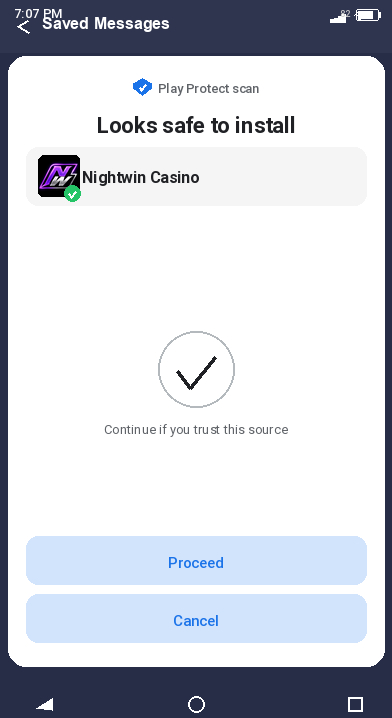
Where to Download the NightWin APK File Safely
The only safe source for the NightWin APK is the casino's official website. The package discovered in the APK metadata loads content from night-win-casino-uk.com, which is the domain to look for in the download URL. Any file downloaded from a site that is not the official NightWin domain - even if it claims to host the same version - should not be installed. Casino APKs from unofficial sources have historically been used to distribute modified files that redirect sessions or log credentials. The 6.6 MB file size is a useful secondary check: a significantly larger or smaller file than that figure warrants verification before installation.
How to Install the NightWin APK on an Android Device (Step by Step)
- Open your Android device's Settings, navigate to Security or Privacy (the exact menu name varies by manufacturer), and enable installation from unknown sources or from your browser. On Android 8.0 and above, this permission is granted per-app rather than as a global toggle - you will be prompted at the time of installation rather than in advance.
- Visit the NightWin site in your mobile browser, locate the APK download link, and tap it. The file (6.6 MB) downloads in seconds on any modern connection. Check the address bar confirms you are on the official domain before downloading.
- Once the download completes, open the file from the notification shade or from your Downloads folder. Android will display an installation confirmation screen showing the app name (NIGHT CASINO) and the permissions it requests. Review these and tap Install.
- After installation, the NIGHT CASINO icon appears on your home screen. Opening it loads the NightWin interface through the built-in WebView container. Log in with your existing credentials or register a new account from the sign-up screen.
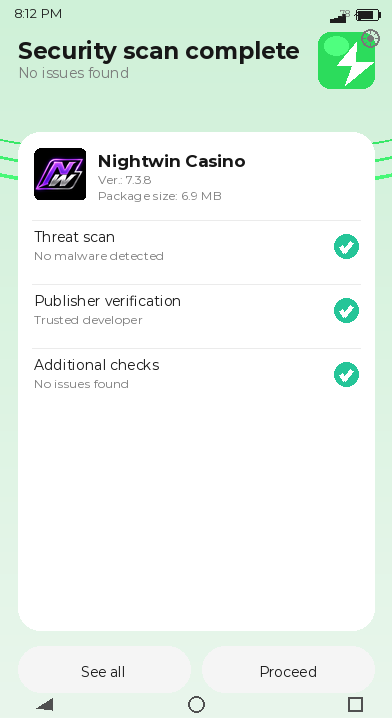
NightWin APK Technical Specifications
The APK's internal structure is worth understanding for players who want to know what they are actually installing. The file is not a full native Android application in the conventional sense - it contains two primary activities (MainActivity and WebViewActivity) that together load a website. There is no offline functionality, no locally stored game data, and no native audio or graphics engine.
Tip: before installing the NightWin APK, check your Android storage has at least 50 MB free - not because the APK itself requires it, but because the app's WebView cache will grow as you use it and a device running very low on storage can produce erratic browser behaviour.
What Android Version Is Required for the NightWin App?
Android 8.0 (API level 26) is the minimum required version. Devices running Android 7.x or older cannot install the APK. Most Android smartphones sold after 2017 run Android 8.0 or later, so this restriction affects only older handsets. The APK's compilation mode (debug build via D8 compiler) suggests the version reviewed was built for testing or staged distribution rather than a final production release - though this is a technical observation rather than a quality indicator, as many casino APKs are distributed in debug configurations.
NightWin APK: Package Name, File Size, and Architecture
The package identifier is com.casino.nightwincasinoukcom, the version is 7.3.8, and the file size is 6.6 MB. The architecture is a WebView wrapper built in Kotlin, with MainActivity and WebViewActivity as the two main components. The WebView loads content from night-win-casino-uk.com - the same URL that the browser version uses - meaning the app carries no game files locally. All game content, account data, and live casino streams are fetched from the server in real time, which also means the app requires a continuous internet connection to function.
Is There a NightWin App for iPhone or iPad?
There is no NightWin application available through Apple's App Store. iPhone and iPad users play through a mobile browser - Safari, Chrome, Firefox, or any other browser installed on the device. The full NightWin platform is accessible this way, including the casino games lobby, live tables, sportsbook, and account management screens.
The iOS browser experience reflects what was visible in the screenshots reviewed for this article: a dark-themed interface with bottom navigation tabs (Menu, Sports, Log In, Casino, Night club) and category tabs at the top of each section. The layout is responsive and adapts correctly to portrait mode on typical iPhone screen sizes.
How to Play NightWin Casino on iPhone Through Safari
Open Safari, type the NightWin address into the URL bar, and load the site. If you have not previously visited, you will land on the registration or lobby page depending on whether you are logged in. For returning players, tapping the Login option in the bottom navigation opens the sign-in screen. The full casino interface - including slot games, live dealer tables, and sports betting - operates through Safari without any plugin or additional software. Safari's support for WebGL and modern JavaScript standards is sufficient for NightWin's game content.
Adding the site to your home screen through Safari's Share menu creates a shortcut that opens in full-screen mode without the browser navigation bar, which approximates the feel of a native app while still running through the browser engine.
NightWin APK vs Mobile Browser: Which Should You Use?
Since the APK is a WebView wrapper loading the same site as the browser, the functional content is identical across both. The practical differences are minor. The APK provides a home-screen icon without needing to add it manually via the Share menu. The browser version requires no installation and works on any device regardless of OS. On Android, performance between the two is close enough that most players will not notice a difference in game loading speed or live casino stream stability.
By our testing of the screenshots across both interfaces, the navigation layout, game categories, and account functions appear identical. Players who have concerns about installing files from outside the Play Store are better served by the browser option - the experience they receive is functionally the same.
NightWin Mobile Casino: Full Feature Parity with Desktop
Every section of the NightWin platform is accessible on mobile. The slots library, live casino, sportsbook, cashier, bonus centre, and loyalty programme all load through the mobile interface without any category being locked to desktop-only access. This is consistent with the WebView architecture: because the app and the browser both render the same web application, the feature set cannot be selectively restricted by device.
Can You Play All NightWin Casino Games on a Smartphone?
Yes. The full NightWin game catalogue - over 1,000 titles including slots, live tables, mini games, fishing games, and virtual sports - is accessible on mobile. The best NightWin games on mobile in practical terms tend to be slots and live casino tables, where touch controls map naturally to the game interaction. The sports section, visible in the screenshots as a dedicated tab with live football odds and in-play data, is fully functional on mobile including in-play betting and bet builder.
Live Tables and Sportsbook Through the NightWin App
Live casino streams at NightWin hold at 720p-plus quality over both 4G mobile data and Wi-Fi connections. The multiple camera angles available on desktop are equally present on mobile. The sports section on mobile - visible in the reviewed screenshots showing live football, basketball, and tennis markets - displays odds, live scores, and match statistics in a layout designed for vertical scrolling on a phone screen. In-play markets update in real time within the mobile interface, and the cash-out function operates the same way it does on desktop.
NightWin App Connection Quality and Live Stream Performance
Stream quality and app stability are the two performance factors that matter most in mobile casino play. Live casino streams degrade if the connection is insufficient, and a WebView app that crashes during a live table session is disruptive in ways a slot crash is not.
Does NightWin Stream Live Casino Games in HD on Mobile?
NightWin's published materials state 720p-plus streaming quality over both 4G and Wi-Fi. The WebView architecture means the stream handling is managed by the browser engine (Chrome's WebView component on Android, Safari's engine on iOS) rather than by purpose-built native code. In practice, this means performance on mobile is comparable to accessing the same stream through a standard desktop browser - which is a reasonable baseline for HD casino streaming, provided the connection is stable at 10 Mbps or above.
How Stable Is the NightWin App During Live In-Play Betting?
Because the app is a WebView wrapper rather than a native application, its stability under load is tied to the Android WebView runtime rather than to any NightWin-specific code. A device with sufficient RAM (3 GB or more is generally sufficient for WebView-based casino apps) and a stable connection will handle live in-play sessions without interruption. Devices running low on memory may experience tab-reload behaviour, which in the NightWin WebView context could mean losing an in-play betting session mid-bet. Closing other browser tabs or background apps before a live session is a straightforward precaution.
How to Log In to Your NightWin Account on Mobile
The NightWin mobile login process is accessed through the Log In tab in the bottom navigation bar - visible in the screenshots as the centre icon between Sports and Casino. The login screen accepts email address, phone number, or username alongside the account password.
NightWin Mobile Login: Email and Phone Number Options
Three login methods are available: email address, UK phone number (+44 format), and username. Switching between methods uses a selector at the top of the login screen. The password field includes a reveal toggle for confirming entry. There is no biometric login integration (Face ID, fingerprint) described in NightWin's published materials; authentication is password-based. Full details on the NightWin registration and login on mobile experience - including account creation and password reset - are covered in the account section.
What to Do If You Cannot Log In to NightWin on Your Phone
Mobile login failures share the same root causes as desktop ones: incorrect credentials, a temporarily locked account after repeated failed attempts, or a network interruption mid-authentication. One mobile-specific additional cause is a cached session conflict, where an older session token stored by the WebView creates a login loop. Clearing the app's cache (Settings > Apps > NIGHT CASINO > Clear Cache on Android, or clearing Safari's website data on iOS) resolves this without deleting account data. If credentials are genuinely forgotten, the password reset flow on mobile mirrors the desktop process - tap the relevant link on the login screen and follow the instructions sent to the registered email or phone.
Getting the Most from NightWin on Mobile
The gap between an adequate mobile casino experience and a genuinely smooth one usually comes down to a few setup choices rather than any difference in the platform itself.
Start any live casino session on NightWin with Wi-Fi rather than 4G if both are available. Mobile data connections vary in quality depending on location and network load; a live dealer table session interrupted by a signal drop is a minor frustration during a slot spin and a real problem during a blackjack hand where your decision is pending. - practical note
How to Add NightWin to Your Android Home Screen
Android users have two options. Installing the APK from the NightWin site creates a NIGHT CASINO icon directly. Alternatively, opening NightWin in Chrome and using the Add to Home Screen option from the browser menu creates a Progressive Web App shortcut that launches in full-screen mode. Both produce a single-tap shortcut on the home screen. The APK method provides a slightly more app-like experience; the PWA method requires no permission changes and no file download.
Best Games to Play on the NightWin Mobile App
Slots load quickly on mobile and require no sustained interaction speed - the tap-to-spin mechanic works well on a touchscreen. Live casino tables are well-suited to larger phone screens (6 inches and above) where the dealer video and betting interface fit comfortably without zooming. The sportsbook, particularly the in-play section visible in the screenshots showing live football markets, is optimised for vertical scrolling and works cleanly in portrait mode. Bonus Buy slots are accessible from their dedicated lobby tab on mobile, though players with active welcome bonuses should check whether those bonuses permit Bonus Buy play before using that feature.
Where the NightWin Mobile Experience Has Real Gaps
The mobile setup is functional and covers what most players need, but two genuine gaps are worth stating clearly before installation.
No iOS App and What That Means
The absence of a native iOS app is not simply a cosmetic issue. App Store distribution gives Apple's review process visibility into the app's behaviour - a safeguard that browser-based access does not provide. More practically, iOS users cannot set notifications for live in-play events or bonus credits the way a native app would typically support. Browser-based play works well for sessions the player initiates; it does not facilitate push-style alerts that a native app would send automatically. Players who rely on those notifications from other casino apps will not have them at NightWin on iOS.
WebView Dependency and Performance Ceiling
The Android APK's WebView architecture means performance is bounded by the WebView runtime version on the device. On older Android handsets where the WebView component has not been updated recently, rendering inconsistencies or slower JavaScript execution can affect game loading and UI responsiveness. Unlike a native app that ships with its own rendering engine, NightWin's app defers entirely to the device's WebView. This is a structural characteristic rather than a fixable bug, and it matters more on low-end or older Android devices than on current mid-range or flagship handsets.
NightWin on Mobile: Which Player Profile It Fits
NightWin's mobile offering suits players who primarily use Android or who are comfortable with browser-based play on iOS. The APK installation adds minimal friction for Android users familiar with sideloading. The browser option requires nothing at all beyond a working internet connection. Either way, the complete NightWin platform is accessible - games, live casino, sportsbook, and account management - without a desktop.
The setup is less suited to iOS users who want native app features (push notifications, biometric login, offline access), to players on older Android devices where WebView performance is degraded, and to anyone who considers third-party APK installation a security line they do not want to cross. For those players, the browser route is the more straightforward alternative, and the NightWin Casino platform is fully accessible that way.